Claude Pricing
An explanation of the plans available for using Claude Code and how usage works.
Official pricing page: https://claude.com/pricing
Plan Comparison
| Plan | Monthly | Annual | Key Features |
|---|---|---|---|
| Pro | $20/month | $17/month ($204/year) | Sufficient usage for typical development work |
| Max 5x | $100/month | $85/month ($1,020/year) | ~5x Pro usage |
| Max 20x | $200/month | $170/month ($2,040/year) | ~20x Pro usage |
*Annual billing is approximately 15% off
Pro Plan
- Full access to all Claude Code features
- Sufficient usage for normal development work
- Provided to workshop participants by the organizers
Max Plan
- Max 5x: Approximately 5x the usage of Pro plan
- Max 20x: Approximately 20x the usage of Pro plan
- Ideal for extended intensive development sessions
- Upgrade option when token limits are reached
What is the 5-Hour Session Window?
Claude’s usage limits are managed through a 5-hour session window.
How It Works
- A 5-hour “window” starts when you send your first request
- Usage during that window is counted toward your limit
- After 5 hours, the window resets, and a new window starts with your next request
Example
10:00 - First request sent → 5-hour window starts
10:00-15:00 - Usage during this period is counted
15:00 - Window ends, reset
15:05 - Next request → New 5-hour window starts (until 20:05)
Key point: The reset happens 5 hours from when you started using, not at a fixed time like midnight.
How to Check Your Usage
You can check your current usage in Claude’s settings:
https://claude.ai/settings/usage
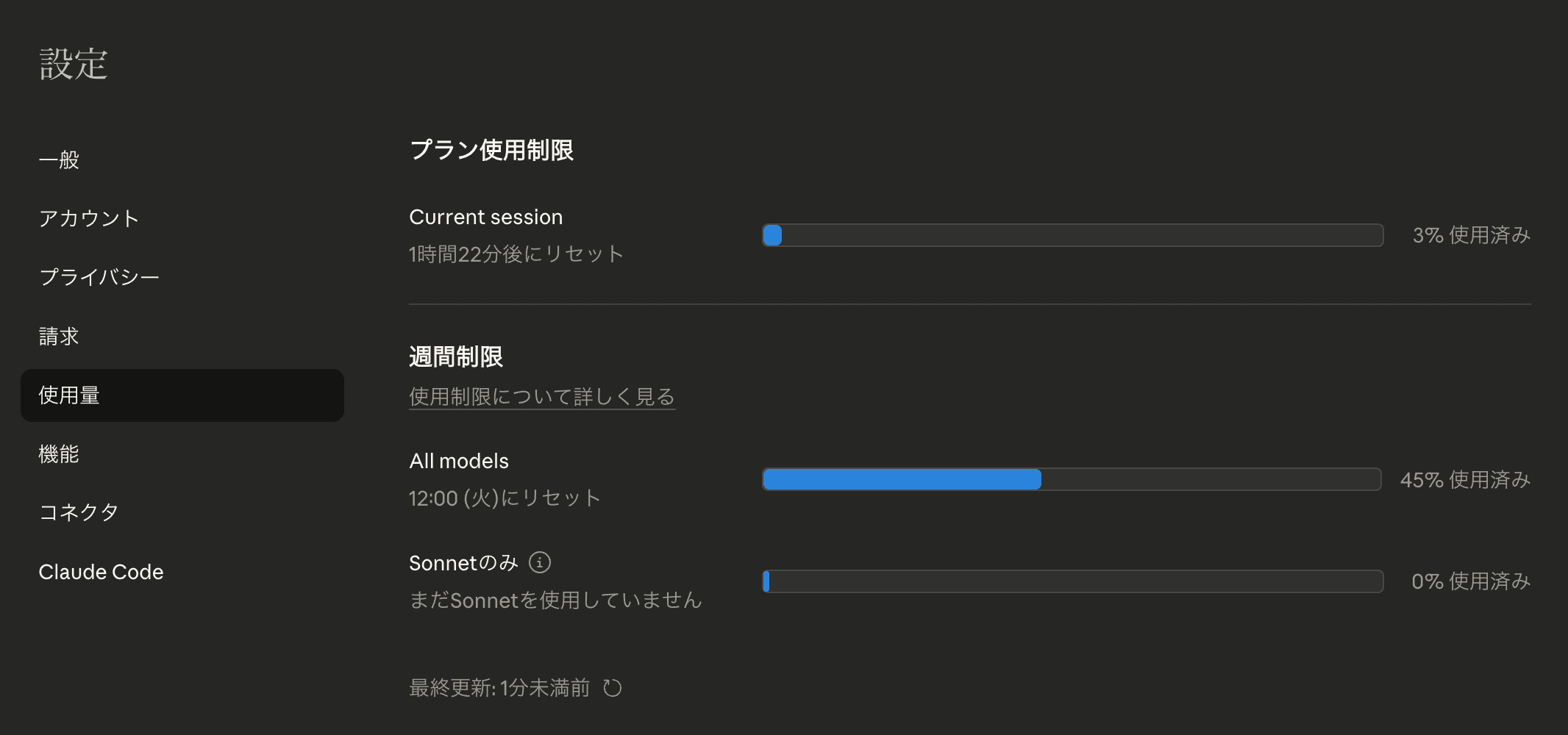
- Session usage: Current usage percentage (%)
- Reset time: Displayed as “Resets at X:XX”
What to Do When You Reach the Limit
- Wait until reset time: Wait until the reset time shown on screen
- Break up your work: Make smaller requests instead of large changes all at once
- Upgrade to Max Plan: Significantly higher limits
What Are Tokens?
Tokens are the “units” consumed in conversations with Claude.
Token Estimates
| Content | Approximate Tokens |
|---|---|
| 1 Japanese character | ~1-2 tokens |
| 1 English word | ~1 token |
| 1 line of code | ~5-15 tokens |
Cases That Consume Many Tokens
- Reading long files
- Generating large amounts of code
- Long conversations (context accumulates)
Tips for Saving Tokens
- Instruct Claude to read only necessary files
- Reset with
/clearwhen conversations get long - Progress in stages rather than requesting large changes at once
Workshop Operations
Basic Policy
- Claude Pro Plan provided to all participants
- Max Plan upgrades available if limits are reached
If You Reach the Limit
- First, consult with a mentor
- Upgrade to Max Plan if needed
- If there’s wait time, use it as time to think about your design
Useful Tool: Claude Usage Tracker
A Chrome extension to visualize your usage.
Installation
- Visit Claude Usage Tracker
- Install the Chrome extension from Chrome Web Store
- Your usage is displayed when you open Claude
What You Can Check

- Current usage (percentage)
- 5-hour session remaining
- Reset time
As a Chrome extension, it’s always visible when using Claude, so you can check your usage anytime.
Summary
- Usage is managed through a 5-hour session window (resets 5 hours from when you start)
- Pro Plan is sufficient for typical development work
- Even if you reach the limit, it recovers at the reset time
- The workshop is set up so you can develop without worrying about limits
Last updated on